
The Khallas badge: put it on your site or in a README
If you use Khallas in your work or your project and want to say so, here is a small ready-made badge in four variants. Copy the HTML line or the Markdown line as it stands and paste it wherever you like. It needs no permission, no sign-up and no account, and we do not track who puts it up.
The four variants
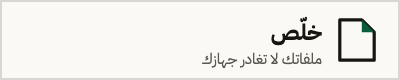
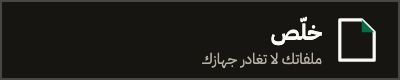
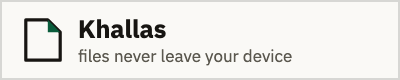
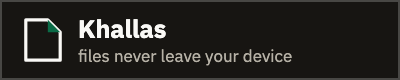
Each language comes in two variants, one for a light ground and one for a dark one. Pick whichever suits your site: the badge does not know the colour of the page it lands on and does not adapt to it, so the choice is yours. It is 200 by 40 pixels, and it is an SVG, so it stays sharp on any screen and weighs under one kilobyte.
Arabic, on a light ground
Arabic, on a dark ground
English, on a light ground
English, on a dark ground
Where to put it
Three places earn their keep. The first is the README of a repository that handles Arabic PDFs, which is where most of the people searching for the same problem will see it. The second is a site footer or a colophon page listing what you use. The third is the end of an article or a tutorial you wrote in which one step was done with Khallas.
The badge is an image inside a link, so it works anywhere that accepts HTML or Markdown: GitHub and GitLab, static site generators, blogging platforms, and documentation pages. One reason it is an SVG with no external font is that GitHub proxies every README image through an intermediary that strips external references, and a badge that needs a font file shows up there as an empty box.
Do not place the badge where it would suggest that Khallas sponsors you, partners with you, or endorses what you are saying. It marks a tool you used, and that is all it means.
Rules for using it
- Use the file as served from its URL. Do not redraw it, recolour it, crop it, or add to it.
- Keep the link to khallas.app. A badge with no link loses half its point.
- Keep the alt text as it appears in the snippet. It is what a screen reader announces, and what shows if the image fails to load.
- Do not put the badge on a page that sells a service as though it were Khallas, or in a context implying we endorse your content.
- Do not host your own copy of the file where you could link the original, so that any fix we make reaches you.
- Do not use the badge in place of the logo. The logo and its rules are on the brand page.
A PNG version, and why you might need it
Beside every SVG badge there is a PNG at twice the resolution, at the same path with a png extension. Use it anywhere that does not render SVG, or renders it its own way: some Markdown previews in text editors, some social platforms, and slide decks and documents.
The real reason a second version exists is Arabic. Arabic is a connected script and its letters change shape according to their place in the word. Browsers do that correctly, but some programs that turn an SVG into a picture do not, and the letters come out separated and in the wrong order. The PNG is drawn in a real browser with the site's own typeface, so what you see in it is what everybody will see.
If the badge will be shown in a browser, choose the SVG: it is sharper and lighter. If you do not know where it will end up, choose the PNG.
- /badge/khallas-ar.pngArabic, on a light ground
- /badge/khallas-ar-dark.pngArabic, on a dark ground
- /badge/khallas-en.pngEnglish, on a light ground
- /badge/khallas-en-dark.pngEnglish, on a dark ground
Technical detail
- Size: 200 pixels wide by 40 tall. The PNG is twice that, 400 by 80.
- Caching: 24 hours. The file is meant to be fixable in place, which is why it is not cached indefinitely.
- The Access-Control-Allow-Origin header is open, so you can draw the badge into a canvas if you need to.
- The file carries no external font, no embedded image and no script. It is shapes and text only, and it weighs under a kilobyte.
- The badge carries no identifier and no tracking parameter in its link, and it does not know who opened the page it sits on.
Common questions
- Can I use the Khallas badge on my site for free?
- Yes, and with no prior permission. Copy the snippet and paste it. The only conditions are that you keep the link to khallas.app and that the placement does not suggest we are your partner, your sponsor, or an endorser of what you say.
- Does the badge work in a README on GitHub?
- Yes. Use the Markdown snippet. The badge is an SVG with no external font and no embedded image, which is what lets it render after GitHub proxies it through the image intermediary that strips external references.
- Why do the Arabic letters look separated in some programs?
- Because that program draws the SVG without shaping Arabic. Browsers do it correctly; some editors and Markdown previews do not. Use the PNG file in those places, since it is drawn in a real browser.
- Does the badge track visitors to my site?
- No. It is a static image with no script, no identifier and no parameter in its link. Our server sees the image request the way it sees any file request, does not tie it to a visitor or a site, and stores nothing from it that identifies anyone.
- Can I change the badge's colours or size?
- Scale it on both axes together if you need to; it is a vector and will not lose its edge. But do not change its colours, its text or its shape: four ready variants cover light and dark grounds in both languages.
- What is the difference between the badge and the logo?
- The badge says you used Khallas; the logo is the product's own identity. If you are writing about Khallas or listing it in a directory, take the logo from the brand page. If you are marking a tool you used, use the badge.
- Can I host a copy of the badge on my own server?
- You can, but linking the original is better. The file is cached for only 24 hours precisely so that any fix we make reaches you, and a copy hosted on your side freezes as it is.